

Posts in this series:
TL;DR: What we’ll build today: A custom guardrail trained on a dataset of safe and unsafe prompts. Then we’ll compare its accuracy to LlamaGuard to see how much better it performs.
We’ll use the krnel-graph library, which handles all the LLM machinery (loading models, extracting activations, training classifiers) while giving us automatic caching so experiments run fast.
Introduction
If you're building production AI applications, you've likely faced these challenges:
- How do you prevent your LLM from going off the rails with unsafe content?
- How do you protect your users' data from prompt injection attacks?
- How do you control model behavior without adding latency or doubling your infrastructure costs?
Right now, most teams choose between three approaches:
- Rely on frontier labs for safety alignment - but this is a one-size-fits-all solution that doesn't know your domain
- Use a separate guardrail model like LlamaGuard, LLM Guard, NemoGuard Lasso, Portkey, etc - but this doubles your infrastructure costs, adds latency, and could be less accurate
- Build custom guardrails by inspecting your model's internal state (our approach) - faster, cheaper, and more accurate. Custom guardrails used to require dedicated AI research teams, but our tooling makes this easy enough for any developer to use.
In this guide, we'll show you how to build a custom guardrail using our krnel-graph library that outperforms conventional approaches by reading your model's "mind" - its internal neural activations - to catch unsafe content before it's generated.
This blog post is an adaptation of one of our use cases for
krnel-graph. See our repository on GitHub for more technical context.
Understanding Conventional Agentic Guardrails
Conventional guardrails involve a user and two separate LLM models: the conversational model that's having the conversation (like ChatGPT or Claude), and a separate guardrail model (like LlamaGuard) which views a copy of the conversation and decides whether each message is safe or unsafe. The guardrail model controls the conversation by estimating whether each message is safe or unsafe. Safe messages pass through, and unsafe messages are stopped or sanitized by the application.
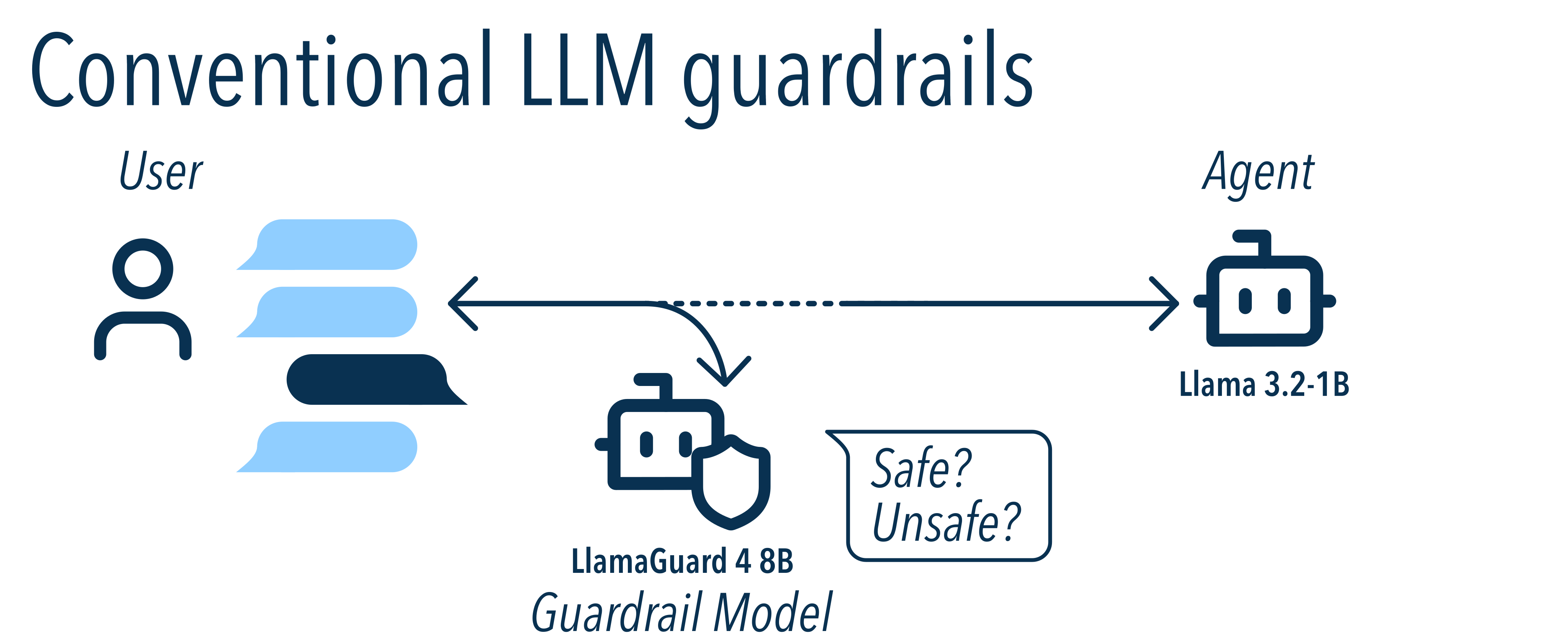
The problem with this approach? It's often inaccurate, expensive, and inflexible:
- Doubles your infrastructure costs: The guardrail model runs separately, requiring its own GPU resources. LlamaGuard 4 uses a 12B parameter model - that's larger than many of the models it's meant to protect (like Llama 3.2 1B or 8B).
- Adds latency: Every message must be processed by two models. Even running them in parallel, your response time is limited by the slower model.
- Hard to customize: Guardrail models are trained on fixed taxonomies of unsafe content. Want to add your own safety rules? You can try prompt engineering, but the model wasn't trained on your specific policies.
- Can't tune sensitivity: False positives frustrate users. False negatives create security risks. But you can't adjust the tradeoff - the model gives you one fixed threshold.
A Better Approach: Probe-Based Guardrails
Here's a different idea: What if we could read the model's "mind" - its internal state - to detect unsafe content?
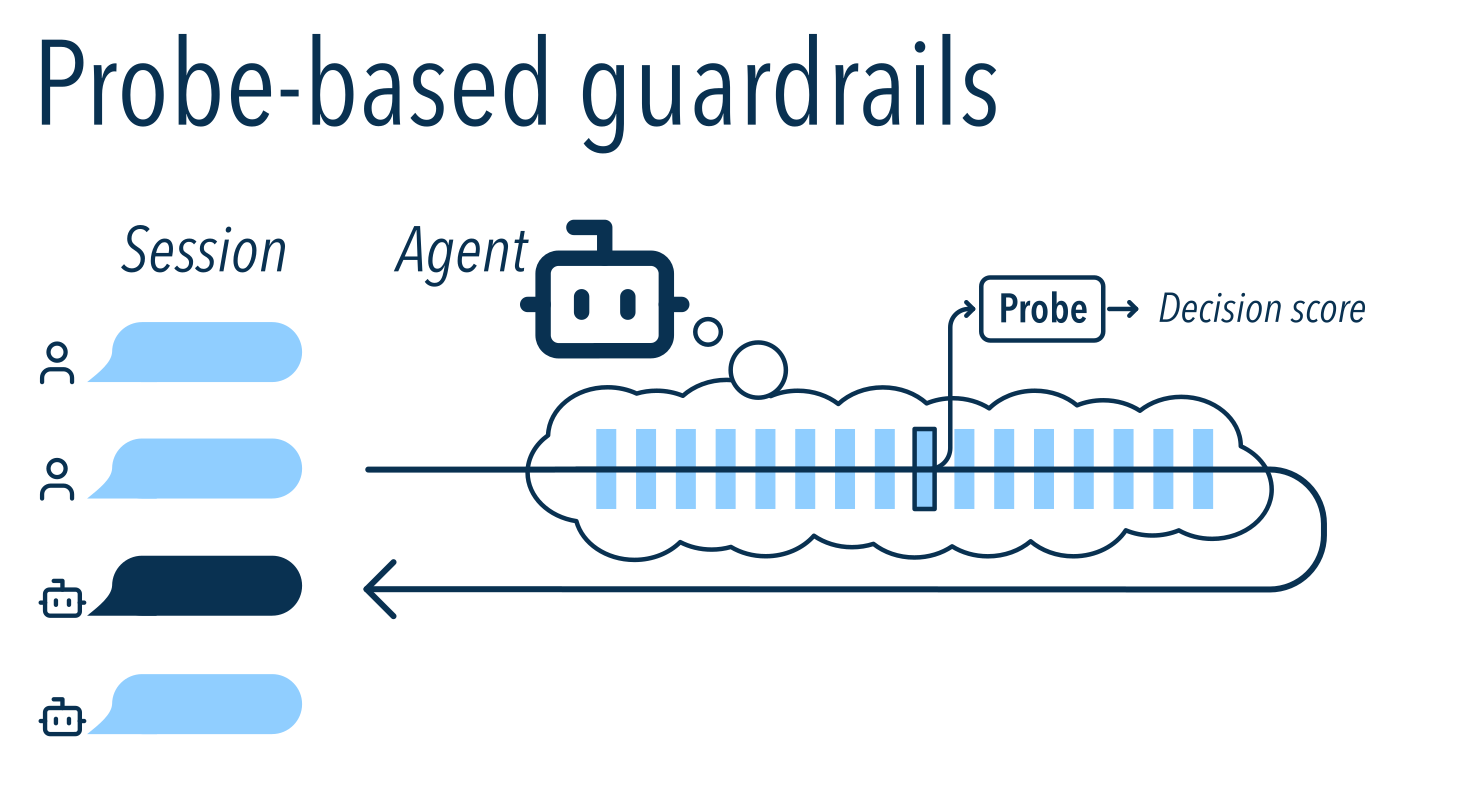
Here's how it works: As your model processes input, it creates internal representations - patterns of neural activations that encode what the model "thinks" about the content. We can capture these activations from one of the model's layers and feed them into a simple, lightweight classifier that predicts whether the content is safe or unsafe.
Why this is better:
- No extra infrastructure: The probe is tiny and runs on CPU in ~100ms. You're using the model you already have.
- No added latency: The probe could run while the model is busy generating output tokens.
- Fully customizable: You train the probe on your data with your safety policies. It learns exactly what matters for your use case.
- Tunable sensitivity: You control the threshold, so you can balance false positives vs. false negatives based on your needs.
The tradeoffs:
- You need to collect training data and label examples as safe or unsafe.
- You need to extract neural activations from your model. (We'll show you how.)
Note: This guide focuses on offline batch evaluation to demonstrate the technique. For real-time production integrations with Ollama, VLLM, HuggingFace, and other inference engines, contact us!
Datasets
There are many datasets intended for studying AI safety and content policy. For this guide, we will focus on conversational datasets between a user and one agent. This method applies to multi-agent interactions as well.
We need datasets that:
- are open-source,
- include a contrasting mix of safe and unsafe examples, and
- are similar to ordinary conversations / user requests we might expect in the real world.
For this guide, we will combine data from the following sources:
- Alpaca, from Tatsu Lab, containing 52,000 safe prompts for various tasks
- BabelScape Alert and Alert-Advanced, containing 45,000 unsafe prompts from a taxonomy of categories including hate speech, criminal planning, controlled substances, sexual content, self-harm, and weapons
- In-the-Wild Jailbreak Prompts from TrustAIRLab, a (somewhat noisy) dataset containing >15,000 jailbreak and non-jailbreak prompts
- SorryBench, with 9,400 unsafe prompts drawn from 44 fine-grained categories (2024 June version)
- SteeringToxic from Undi95, which has 7,300 unsafe prompts
- AdvBench from WalledAI, with 520 harmful behaviors
- Many Shot Jailbreaking by Vulkan Kutal, with 266 jailbreaks
- GPTFUZZER from Jiahao Yu et al with 100 unsafe prompts
This mix totals 82,303 harmful prompts and 61,639 safe prompts. For this experiment, we will sample 10% of this data for a smaller slice.
Set up your environment
Follow these steps on a Linux or macOS system. For Windows, you can use WSL or follow along in the native command line.
-
Download and install
uvfrom Astral's installation page.uvmanages python versions, environments, and dependencies in self-contained isolated environments, so there's little risk of breaking your system.- You can use another python package manager like
piporconda, but you'll need to change all the examples.
-
Make a new folder for this project. You can either clone this repository and play in this example folder, or create a fresh workspace:
$ cd /tmp
$ mkdir guardrail_comparison
$ cd guardrail_comparison
$ git clone https://github.com/krnel-ai/krnel-graph.git
$ uv init --name guardrail_comparison
Install dependencies into this project folder:
$ uv add krnel-graph[ml,viz] huggingface-hub jupyterlab duckdb pandasIf you cloned this example repository, the dependencies are already in this folder's
pyproject.toml. -
Log into your HuggingFace account on the website and create an access token with
Read access to contents of all public gated repos you can accessoption checked. Then copy the generated token into the HuggingFace CLI:$ uv run hf auth login -
Request access to SorryBench and the Llama, Llama-2, and LlamaGuard models. If you want to run without waiting for dataset approval, you can comment the relevant lines from
make_data.py, but your results will differ somewhat from ours.
Preparing the data
Run our data preparation script to download the data:
$ cd examples/01-guardrail-comparisons; uv run make_data.pyThis should only take 30 seconds or so. You should see output like the following:
Downloading datasets... (takes ~30 sec)

Row counts:
Source                        Safe?  Expected     Actual
----------------------------------------------------------------------
GPTFuzz                           1       100        100 ✅ OK
advbench                          1       520        520 ✅ OK
babelscape_alert                  1     14092      14092 ✅ OK
babelscape_alert_adv              1     30771      30771 ✅ OK
jailbreak_llms                    0      9638       9638 ✅ OK
jailbreak_llms                    1     19738      19738 ✅ OK
many-shot-jailbreaking            1       266        266 ✅ OK
sorrybench                        1      9439       9439 ✅ OK
steering-toxic                    1      7377       7377 ✅ OK
tatsu-lab-alpaca                  0     52001      52001 ✅ OK
The resulting dataset should contain 143,942 rows from these 9 datasets.
💣 Expand for troubleshooting steps
-
Row count mismatches can happen if the original data has changed since this guide was written. This can cause your results to differ from ours, but this isn't generally a large problem unless you're missing one of the larger datasets.
-
Unable to connect to URL: If you see an error like
_duckdb.HTTPException: HTTP Error: Unable to connect to URL "hf://...": 401 (Unauthorized)., you need to log in to HuggingFace withuv run hf auth login. You may also need to request access on HuggingFace if the dataset is gated. If dataset is gated then make sure your HF token hasRead access to contents of all public gated repos you can accesschecked. If all else fails, comment out the relevant lines fromexamples/01-guardrail-comparisons/make_data.pyand run without those datasets.
Building Your Guardrail
Now for the fun part: extracting the model's internal state and training a probe on it.
Normally, this would require deep knowledge of PyTorch internals, different model architectures, and hardware optimizations. But krnel-graph handles all of that for you with a simple, declarative API.
Let's create a file called main.py and start building:
#!/usr/bin/env -S uv run
import krnel.graph as kg
runner = kg.Runner()
Our dataset has three columns:
prompt: The text content (user input)harmful: A true/false label indicating whether the prompt is unsafesource: Which dataset the example came from
# Load the dataset from a local parquet file
ds = runner.from_parquet("dataset.parquet")
ds = ds.take(skip=10) # sample a tenth of the dataset

# Get column references
col_text    = ds.col_text("prompt")
col_harmful = ds.col_boolean("harmful")
col_source  = ds.col_categorical("source")

# Split data into training (75%) and testing (25%) sets
col_split = ds.assign_train_test_split()
Now we extract the neural activations - the internal representations the model creates when processing each prompt. We'll use the last layer of Llama 2 7B and capture the activation values for the final token:
# Extract activations
X = col_text.llm_layer_activations(
    model_name="hf:meta-llama/Llama-2-7b-chat-hf",
    layer_num=-1,      # last layer
    token_mode="last", # last token
    batch_size=4,      # tweak for your hardware
    max_length=2048,   # truncate prompts longer than this many tokens
    dtype="float16",
)

# Train a classifier to predict unsafe content from activations
probe = X.train_classifier(
    "logistic_regression",
    positives=col_harmful,        # what we're trying to predict
    train_domain=col_split.train, # use only training data for training
    preprocessing="standardize",  # normalize the activation values
    params={"C": 0.01},           # regularization strength
)

# Print activations to the console
if __name__ == "__main__":
    print("Activations:")
    print(X.to_numpy())
    print(X.to_numpy().shape)
Extracting the activations should take about ten minutes to run on good hardware.
Each step is automatically cached. If you re-run the script, krnel-graph will print the result instantly.
💣 Expand for troubleshooting steps
- There's a "CUDA out of memory" error!
- Try to lower
batch_sizeto 1. - Try a smaller model, like
"hf:meta-llama/Llama-3.2-1B-Instruct"
- Try to lower
- It's taking forever!
- Subsample the dataset. Change
tods = runner.from_parquet("dataset.parquet") ds = ds.take(skip=10)
This will sample 1/100th of the dataset.ds = runner.from_parquet("dataset.parquet") ds = ds.take(skip=100) - Check your GPU hardware. If you run
nvidia-smi, you should see GPU usage while the script is running. Llama2-7b requires a GPU with at least 20GB VRAM. You can also use a smaller model, like"hf:meta-llama/Llama-3.2-1B-Instruct". We tested llama2-7b on:- a 32GB Apple Macbook Pro with Apple Silicon (M1 Max, ca. 2021) via the
mpsdevice - a GCP instance running Ubuntu with an NVIDIA A100 40GB via the
cudadevice
- a 32GB Apple Macbook Pro with Apple Silicon (M1 Max, ca. 2021) via the
- Subsample the dataset. Change
👩🏻💻 Here's the full code we've written so far
import krnel.graph as kg
runner = kg.Runner()
# Load the dataset from a local parquet file
ds = runner.from_parquet("dataset.parquet")
ds = ds.take(skip=10) # sample a tenth of the dataset
# Dataset columns
col_text = ds.col_text("prompt")
col_harmful = ds.col_boolean("harmful")
# Assign train/test split
col_split = ds.assign_train_test_split()
# Extract activations
X = col_text.llm_layer_activations(
model_name="hf:meta-llama/Llama-2-7b-chat-hf",
layer_num=-1, # last layer
token_mode="last", # last token
batch_size=4, # tweak for your hardware
max_length=2048, # truncate prompts longer than this many tokens
dtype="float16",
)
# Train a classifier to predict unsafe content from activations
probe = X.train_classifier(
"logistic_regression",
positives=col_harmful, # what we're trying to predict
train_domain=col_split.train, # use only training data for training
preprocessing="standardize", # normalize the activation values
params={"C": 0.01}, # regularization strength
)
if __name__ == "__main__":
print("Activations:")
print(X.to_numpy())Behind the scenes, krnel-graph is doing a lot of work for you:
- Framework abstraction:
krnel-graphcan use HuggingFace models with thehf:prefix, TransformerLens models with thetl:prefix, and Ollama models with theollama:prefix. - Fast iteration: Change your model, adjust your classifier, or tweak your threshold -
krnel-graphfigures out what needs to be recomputed. - Automatic caching: Run your experiment once, change a parameter, and only the affected steps re-run. No more manually managing result files or worrying about stale data.
We built krnel-graph for teams. Keep your main experiment in source control, point everyone to a shared cache location (S3, GCS), and everyone automatically reuses each other's expensive computations. Learn more about our design philosophy in the docs.
Evaluating Performance
Our probe outputs a confidence score for each prompt. To make a decision, we compare that score to a threshold. This gives us four possible outcomes:
- True negative: Safe prompt with low score → correctly allowed
- False positive: Safe prompt with high score → incorrectly blocked (user frustration)
- False negative: Unsafe prompt with low score → incorrectly allowed (security/reputation risk)
- True positive: Unsafe prompt with high score → correctly blocked
Let's evaluate our classifier's performance using krnel-graph's built-in evaluation tools:
# Evaluation (JSON report)
probe_result = probe.predict(X).evaluate(
    gt_positives=col_harmful,
    split=col_split,
    score_threshold=0.0,
)

if __name__ == "__main__":
    print("\n\nResults on TEST SET:")
    print(probe_result.to_json()['test'])
The result is a JSON report of test set metrics. We added some explanatory comments below:
{
    # Number of samples (=143942 input * 0.1 subsample * 0.25 test set)
    "count": 3599,
    # Label distribution: number of unsafe (true) and safe (false) samples
    "n_true": 2049, "n_false": 1550,
    # The average score output by the classifier (logistic regression decision function, for smoke test)
    "avg_score": 0.6642874344722254,

    # Continuous metrics - AP and area under ROC curve.
    # (Doesn't depend on score_threshold)
    "average_precision": 0.999267973058908,
    "roc_auc": 0.9990280073678741,

    # Various accuracy metrics (unweighted, across entire test set)
    # (Only appears when score_threshold is set)
    "accuracy": 0.9877743817727146,
    "precision": 0.9873602333495382,
    "recall": 0.9912152269399708,
    "f1": 0.9892839746712129,

    # Confusion matrix at the given score threshold
    # predicted = negative    positive
    "confusion": {"tn": 1524, "fp": 26,     # gt = negative
                  "fn": 18,   "tp": 2031},  # gt = positive

    # Precision/recall curve
    "precision@0.1": 1.0,
    "precision@0.2": 1.0,
    "precision@0.3": 1.0,
    "precision@0.4": 1.0,
    "precision@0.5": 1.0,
    "precision@0.6": 1.0,
    "precision@0.7": 1.0,
    "precision@0.8": 0.9994404029099049,
    "precision@0.9": 0.9989711934156379,
    "precision@0.95": 0.9979654120040692,
    "precision@0.99": 0.9916911045943304,
    "precision@0.999": 0.9237364620938628
}
These numbers are somewhat noisy because the dataset is small. After all, we sampled down to only 1/10th of the dataset and held out 25% of the remainder for testing, so the metrics are computed on 143942 * 0.1 * 0.25 = 3599 samples. To run across all data, remove the ds = ds.take(skip=10) line and rerun.
Understanding the Metrics
-
Accuracy (98.77%): We're correct 98.77% of the time. Not bad! But accuracy alone can be misleading - a guardrail that always says "safe" would be right 99% of the time in the real world (since most prompts are safe).
-
Confusion matrix: Shows the breakdown of all four outcomes:
Predicted Safe Predicted Unsafe Actually Safe 1524 26 Actually Unsafe 18 2031 Our probe-based guardrail makes 26 false positive errors (annoying 26 users) and 18 false negative errors (missing 18 unsafe prompts).
-
Precision @ recall: Perhaps the most important metric for production. If we tune the threshold to catch 99% of unsafe content (99% recall), what fraction of our blocks are false positives? For our classifier: 99.2% precision at 99% recall - meaning only 0.8% of blocks are false alarms.
Tuning your guardrail: The
score_thresholdparameter controls your sensitivity. Lower threshold = catch more unsafe content but more false positives. Higher threshold = fewer false positives but might miss some unsafe content.
Comparing Against LlamaGuard
Meta’s LlamaGuard is a 7B parameter model dedicated to content safety. It remains one of the most popular open-source guardrail solutions.
LlamaGuard is a separate model that reads conversations and outputs either "safe" or "unsafe". It's been fine-tuned on 13k safety examples and uses a specific system prompt to guide its behavior.
The problem: LlamaGuard typically gives you a binary answer - "safe" or "unsafe" - with no way to tune the sensitivity. You're stuck with its default threshold, which might not match your needs.
Our solution: Instead of generating text, we can look at LlamaGuard's internal confidence scores (called logits) for the "safe" and "unsafe" tokens. This gives us:
- A continuous score we can threshold however we want
- The ability to tune precision vs. recall for our use case
- No risk of unparseable outputs
Here's how to extract those scores using krnel-graph:
# Get LlamaGuard logits
llamaguard_scores = col_text.llm_logit_scores(
    model_name="hf:meta-llama/LlamaGuard-7b",
    batch_size=1,
    max_length=2048,
    logit_token_ids=[9109, 25110],
    # these are the token IDs in the
    # vocabulary corresponding to "_safe"
    # and "_unsafe"
    dtype="float16",
    torch_compile=True,
)
llamaguard_unsafe_score = (
    # Difference of "unsafe" - "safe" logits
    llamaguard_scores.col(1) - llamaguard_scores.col(0)
)
llamaguard_result = llamaguard_unsafe_score.evaluate(
    gt_positives=col_harmful,
    score_threshold=0,
    split=col_split,
)

if __name__ == "__main__":
    import pandas as pd
    print("\nComparison between LlamaGuard and Krnel Probe:")
    print(
        pd.DataFrame({
            "LlamaGuard": llamaguard_result.to_json()['test'],
            "Krnel Probe": probe_result.to_json()['test'],
        }).loc[['accuracy', 'precision', 'recall', 'precision@0.99']]
    )
The code above extracts logit scores for just two tokens from LlamaGuard's vocabulary:
- Token 9109: "▁safe"
- Token 25110: "▁unsafe"
We then compute the difference (unsafe_score - safe_score) to get a single safety score. When this difference is positive, LlamaGuard thinks the content is unsafe.
The Results
Here's how our custom guardrail stacks up against LlamaGuard:
| Metric | LlamaGuard | Krnel Probe |
|---|---|---|
| accuracy | 76.8% | 98.8% |
| precision | 98.9% | 98.7% |
| recall | 59.9% | 99.1% |
| precision@0.99 | 80.4% | 99.2% |
What this means:
- LlamaGuard's default threshold is tuned for high precision (few false positives) at the cost of recall (it misses 40% of unsafe content!)
- Your probe-based guardrail that you just trained catches 99.1% of unsafe content while maintaining 98.7% precision
We can tune LlamaGuard's threshold to be more sensitive (by adjusting score_threshold=-4.5), which brings its recall up to 94%, but even then:
- At 99% recall, LlamaGuard has 19.6% false positives (1 in ~5 blocks are wrong)
- At 99% recall, our guardrail has 0.8% false positives (1 in ~125 blocks are wrong)
That's 25× fewer false positives - meaning far fewer frustrated users and smoother conversations.
Need to run experiments like this at scale? The
krnel-graphCLI can optionally distribute computation across GPU clusters while keeping a shared cache in S3 or GCS. Configure once withuv run krnel-graph config --store-uri s3://your-bucket/, then run expensive operations on GPUs while accessing results from your laptop. See the docs for details or contact us at info@krnel.ai
Summary
In this guide, you learned how to build a custom guardrail that:
- Outperforms LlamaGuard by 25× in false positive rate at high recall
- Doesn't require extra infrastructure - uses your existing model
- Adds minimal latency - the classifier runs in ~100ms on CPU
- Is fully customizable - train on your own data with your own policies
- Lets you tune sensitivity - adjust the precision/recall tradeoff for your use case
This approach - inspecting a model's internal state rather than running a separate guardrail model - represents a fundamental shift in how we think about AI safety. By "reading the model's mind," you get better accuracy at a fraction of the cost.
Next Steps
- Try it yourself: Clone the krnel-graph repo and follow this tutorial
- Explore other use cases: Model introspection works for more than just safety - try steering, debugging, or feature detection
- Go to production: Contact us at info@krnel.ai for low-latency runtime integrations with Ollama, VLLM, HuggingFace, and other inference engines, or accessing proprietary value-add pipelines such as adversarial training, higher accuracy, and better data generation procedures.
The full power of AI safety shouldn't require a PhD or a massive infrastructure budget. With tools like krnel-graph, you can build production-grade guardrails that are faster, cheaper, and more accurate than conventional approaches.